

This post helps cube designers and Commander brewers find the exact MTG cards they need by explaining Searching with Scryfall syntax and reusable query patterns, so they can tune archetypes faster and spend less time scrolling.
TLDR
- Searching with Scryfall is just typing filters like
t:wizard(type),mv<3(mana value), oro:"draw a card"(Oracle text) into one search line. - Spaces act like AND. Use
orplus parentheses for either/or searches. - Learn three power tools early:
id:(color identity),o:/fo:(rules text), and-(exclude false positives). - Use
unique:cardswhen you want “one version of each card,” andunique:printswhen you care about a specific printing or art. - Save your best searches as “recipes” for archetypes (blink, spells, graveyard, artifacts, lands, and so on).



Why Scryfall matters for cube designers
Cube building is mostly two activities:
- Designing: deciding what the environment should reward
- Debugging: asking “do I have enough of X?” and “what are my options for Y?”
The debugging part is where Searching with Scryfall shines. When you can ask precise questions, you can tune faster:
- “Show me cheap blue creatures that loot.”
- “Show me lands that fit this color identity.”
- “Show me removal spells that exile instead of destroy.”
- “Show me cards that trigger on attack, but not ones that care about +1/+1 counters.”
If you only search by card name, you mostly find cards you already know. Syntax searching finds the cards you forgot, the cards you never saw, and the weird glue cards that make a cube actually draft the way you intended.
Searching with Scryfall ladder
When you are building a query, do it in layers. This keeps you from writing a 14-term monster query that you can’t edit later.
- Set the lane: color or identity (
c:/id:), and card type (t:) - Set the power band: mana value (
mv) and sometimes stats (pow,tou) - Describe the job: rules text (
o:orfo:) and keywords (keyword:) - Cut the noise: exclude patterns with
-and refine with quotes - Make it usable:
order:sorting,unique:collapsing,prefer:print choices
You can stop at any step when the results are “small enough to read.”
The core idea: field:value
Most Scryfall syntax is “field, colon, value.”
t:wizardsearches the type lineo:countersearches Oracle textr:uncommonsearches rarityf:modernsearches format legalitye:mh2searches a set code
A few fast examples:
t:wizard
t:"legendary creature" t:wizard
o:"draw a card"
r>=rare
f:pauper t:creature
Cheat sheet table (cube-focused)
| What you’re trying to do | Keyword(s) | Example query | Why a cube designer uses it |
|---|---|---|---|
| Find a card type or subtype | t: / type: | t:artifact t:equipment | Build packages (equipment, tokens, artifacts-matter) |
| Filter by mana value | mv / manavalue | mv<=2 t:creature | Tighten curve, support aggro, speed up gameplay |
| Filter by rules text | o: / oracle: | o:"whenever ~ attacks" | Find templated mechanics across many sets |
| Include reminder text too | fo: | fo:cycling t:creature | Catch keywords that only appear in reminder text |
| Commander color identity | id: / identity: | id<=esper t:instant | Find cards playable under an identity (also useful for “Bant section” style constraints) |
| Exactly these colors | c= / color= | c=ur t:instant | Build gold sections that stay truly two-color |
| Exclude results | - / not: | o:counter -o:"+1/+1 counter" | Remove common false positives |
| Either/or options | or + ( ) | (t:instant or t:sorcery) o:exile | Combine buckets without losing control |
| Collapse duplicate printings | unique: | unique:cards | Read one entry per card, not 18 printings |
| Sort for scanning | order: | order:mv direction:asc | Quickly see curve, rarity, price, and so on |
Combining terms (spaces mean AND)
If you write:
c:u t:wizard t:legendary
…Scryfall interprets it like:
show me cards that are blue AND are wizards AND are legendary
This is the single biggest quality-of-life feature. You “dial in” a search instead of running ten separate searches.
Numbers and comparisons
For numeric fields, swap : for comparison operators like <, >, <=, >=, or !=.
mv<3
mv=1 pow>1
t:creature mv<=2 tou>=3
This is how you build a cube “power band” into a search instead of eyeballing it later.
Color vs color identity (and why you should care)
Color (c: / color:) cares about what colors the card is.
Color identity (id: / identity:) cares about what colors the card contains across its rules, including mana symbols in the text box. That distinction matters for Commander, but it’s also useful in cube design when you want to constrain a section to “playable in this lane.”
Practical patterns:
- Exactly Izzet gold cards:
c=ur - Cards that are at least Azorius (and maybe more):
color>=uw - Cards that fit within Esper identity:
id<=esper - Colorless identity lands:
id:c t:land
Also, Scryfall accepts a lot of nickname color sets (guilds, shards, wedges). That makes it faster to type “bant” than “wug” when you’re brainstorming.
Oracle text searching: where the real answers live
Card names are vibes. Oracle text is reality.
The o: keyword searches the official, current rules text. That means you can search across the entire game’s history using modern wording.
Useful habits:
- Use quotes for multi-word phrases:
o:"at the beginning of your upkeep" - Use
~as a placeholder for the card’s own name (great for reusable templates) - Use
fo:when you want reminder text included (it pulls in things like cycling text that might not appear as a keyword line you can search cleanly)
Templates you can steal
Enter-the-battlefield triggers often include a consistent phrase:
t:creature o:"~ enters the battlefield"
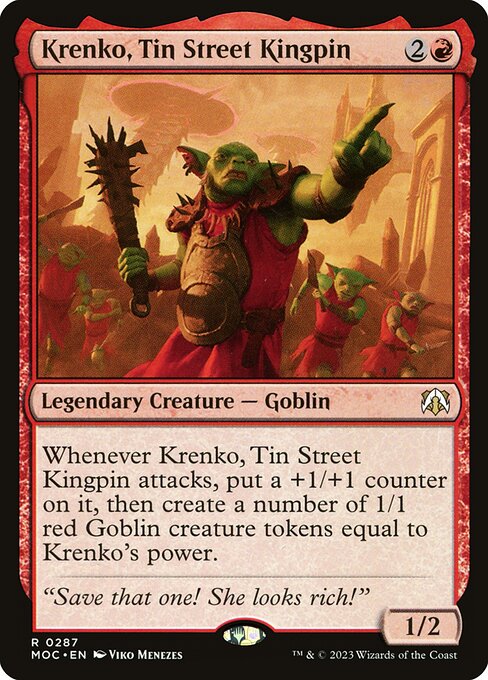
Attack triggers can be caught with a reusable pattern:
o:"whenever ~ attacks"
Here’s a real example card with that structure:

Mana symbols and the tap symbol
Scryfall represents mana symbols in curly braces in rules text searches. That’s useful any time you’re searching for:
- mana producers
- activation costs
- cost reductions
- specific colored requirements
Examples:
o:"{T}: add"
o:"{G}"
And if you want to get fancy, regex can match “taps with no other payment” very cleanly:
t:creature o:/^{T}:/
Sculpting results: negation and OR
Exclude junk with -
If you learn one “advanced” trick, make it this one.
When you see a consistent false positive pattern, subtract it:
o:counter -o:"+1/+1 counter" -o:"-1/-1 counter"
t:artifact -o:"nonartifact"
id:uw -t:land
Expand searches with OR + parentheses
If you want “instants or sorceries” you need grouping, otherwise the query can drift.
(t:instant or t:sorcery) (o:destroy or o:exile)
That one line is an entire “removal spell” search starter.
Cube-specific power tools you should actually use
1) is: land cycle filters
Scryfall supports a bunch of “cycle” style shortcuts that cube designers love because they match how we think about manabases.
If you’re tuning fixing, these save time:
is:shockland
is:fetchland
is:checkland
is:painland
is:scryland
is:dual
This is especially helpful when you are trying to answer questions like “which fixing cycle am I missing for this power band?”
2) Sorting and collapsing results
When you’re scanning, you usually want one row per card. That’s unique:cards.
When you’re choosing a printing for aesthetics (or you want to compare frames), switch to unique:prints and add a sort or preference.
!"Lightning Bolt" unique:prints
order:released direction:desc
prefer:newest

3) Tagger tags (function: / otag:)
Scryfall has tag-based search that can be incredibly fast for cube work because it searches intent, not phrasing.
If you want “cards that function as removal,” tags can be a shortcut:
function:removal
Treat tag searches like a turbo button, not a judge ruling. They’re great for discovery, and you should still sanity-check the results.
4) Built-in cube lists (cube:)
Scryfall can also filter cards that appear in certain supported cube lists. That’s useful when you want to:
- compare your list to an established environment
- find “missing staples” for a power level you’re targeting
- browse a known cube’s card pool as inspiration
Example:
cube:vintage
cube:modern t:planeswalker
Practical searches (copy, paste, tweak)
These are not “perfect.” They are fast. Expect a few false positives, then tighten with - or quotes.
Aggro and curve support
t:creature mv=1 pow>=2
t:creature mv<=2 o:"haste"
Looting and rummaging (card selection)
t:creature o:draw o:discard
t:creature o:":" o:draw o:discard
Blink and flicker packages
(o:exile or o:exiled) o:return
o:"exile target" o:"return" -t:land
Spells-matter payoffs
o:whenever o:cast (t:instant or t:sorcery)
Graveyard interaction
o:/exile.*graveyard/
o:/return.*from your graveyard/
Wraths and sweepers
o:"destroy all"
o:"exile all" t:sorcery
Mana fixing for a color lane (Commander-style constraint)
id<=uwg t:land
id:ur t:land
Budget or rarity constrained cubes
r<=uncommon
r<=uncommon usd<2
Common mistakes that waste the most time
- Using color when you meant identity. If you’re building a “Bant section” and hybrid or off-color activations matter,
id:is usually the safer constraint. - Forgetting quotes. If your phrase has spaces or punctuation, quote it.
- Not grouping OR conditions. Parentheses prevent “half your query” from going rogue.
- Not subtracting obvious junk. If you see the same wrong pattern 30 times, negate it once and move on.
- Scanning unsorted results. Add
order:mv,order:rarity, ororder:releasedwhen you’re reading.
FAQ
What’s the difference between o: and fo:?
o: searches Oracle text (current official rules text). fo: searches full Oracle text, which includes reminder text. Use fo: when you’re trying to catch keywords that might only appear in reminders.
How do I search for Commander color identity?
Use id: (or identity:). If you want “within this identity,” use comparison-style constraints like id<=esper. If you want “exactly these colors,” use id=ur, etc.
Why does o:counter show me tons of +1/+1 counter cards?
Because “counter” appears in lots of contexts. The fix is subtracting the patterns you don’t want:
o:counter -o:"+1/+1 counter"
How do I choose a specific printing or art for a card?
Switch from unique:cards to unique:prints and sort or prefer:
!"Lightning Bolt" unique:prints order:released direction:desc
You can also use prefer:newest if you usually want the most recent paper printing.
Can I use Scryfall syntax for a Modern cube or Pauper cube?
Yes. Use f: (format legality) to keep your search within a constructed card pool:
f:modern
f:pauper t:creature