

Rotisserie Draft is one of those Cube formats that feels obvious the first time you try it: instead of opening packs, you draft from the entire cube at once. Every pick is public, every hate-pick is loud, and the table talk starts on pick one and never really stops.
It’s also one of the best ways to run Cube when your group can’t all be in the same room. Rotisserie turns drafting into an asynchronous game you can run in a shared doc and a group chat, then cash out the value later with a round-robin.
If you’ve ever wanted Cube to feel a little more like “high-stakes fantasy draft,” this is your format.
What is a rotisserie draft?
Think of Rotisserie as drafting from one gigantic pack—the full cube list is available to everyone, all the time. Players take turns selecting a card from the pool, and once a card is taken, it’s gone.
The big change versus normal Cube draft is information: there are no hidden picks, no “maybe I’ll wheel this,” and no pretending you didn’t first-pick a build-around. You’re drafting in full view, which creates a totally different kind of tension.
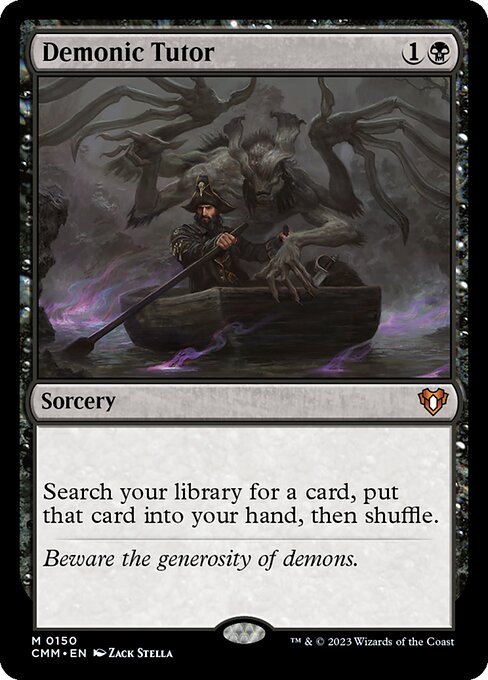
If you want one card that captures the “public draft, public consequences” vibe, it’s this:


How to play MTG Rotisserie Draft
Rotisserie is usually done with snake picks. That means the pick order goes from Player 1 → Player 8, then reverses Player 8 → Player 1, and repeats. The players on the ends (1st and last) get two picks in a row at each turn-around, which helps balance the advantage of picking first.
A common “default” is:
- 8 players
- Draft until each player has 45 picks (so 360 total picks), which fits cleanly with a 360-card cube—but you can adjust this for any cube size.
Some groups also switch to double picks later in the draft (each player takes two cards at once) to speed things up once lanes are established.
In-person vs asynchronous rotisserie
In-person rotisserie
If you’ve got the space and the energy, laying a cube out on a big table is extremely fun. It’s also a commitment. The draft itself can take 2–3 hours depending on how much table talk you allow (and you should allow it).
In-person rotisserie tends to feel like an “event draft.” Plan snacks, plan breaks, and plan for the moment where someone realizes they left a key piece of interaction on the board for the entire table to see.
Asynchronous rotisserie
This is where rotisserie really shines. Most groups run it virtually in a shared spreadsheet (or similar shared draft board). It’s surprisingly addictive: you’ll never have so much fun watching a single cell get filled in.
The basic flow is:
- Everyone has access to the cube list + the draft sheet.
- The active player writes their pick into the next slot.
- They ping the next player (group chat/Discord/text) that it’s their turn.
- Repeat until you hit the agreed pick count.
Depending on your group, an asynchronous rotisserie can take a few days… or a few weeks. That’s not a bug. It’s a feature if your goal is “keep Cube alive even when adult schedules are a war crime.”
The real secret: how games usually work afterward
Rotisserie drafting takes long enough that most groups want to maximize gameplay from the decks they built. The most common approach is a round-robin:
- Each player plays each other player
- Best-of-three matches
- Play whenever schedules allow (in-person, SpellTable, LGS meetups, whatever works)
There’s also an interesting rules wrinkle: because drafted pools are public, players effectively have full knowledge of what opponents could be doing. Most groups handle that by requiring players to lock a main deck for the event (so you can’t “pre-sideboard” for each opponent), while still allowing normal sideboarding between games.
That keeps things competitive without turning the whole league into “metagame chess where everyone rebuilds their 75 for the next opponent.”
Variations that actually matter
Rotisserie is flexible, and you should tune it to your group instead of forcing the “standard” version.
Here are the knobs that change the experience the most:
- Player count: 8 is common, but 6–12 works great. For small groups, players can draft multiple decks each to simulate a larger table.
- Number of picks: you can stop earlier than 45 picks because there are fewer “dead picks” than in booster drafting. Just agree up front.
- Double picks: once lanes are stable, switching to double picks speeds up the endgame with minimal downside. Remember the ends effectively take four cards at a time during the snake turn.
- Draft pacing rules: asynchronous drafts can drag if nobody knows expectations. A simple “24-hour pick timer” (or whatever your group tolerates) keeps things moving.
Rotisserie strategy tips
Rotisserie plays differently than a normal cube draft because you’re drafting against known opponents, with perfect information about availability.
A few practical heuristics go a long way:
- Decide early whether you’re building a plan or building a weapon.
Sometimes you’re drafting synergy. Sometimes you’re drafting the tools to make everyone else miserable. Both are valid; just don’t drift. - Interaction is more valuable than it looks.
In a normal draft you can “hope to see removal.” In rotisserie, you either take the premium answers… or watch them disappear. - Mana matters sooner than you think.
Fixing isn’t going to wheel “by accident.” If you want a greedy deck, you must invest picks in the infrastructure. - Hate-picks are real, but expensive.
You’ll see the whole table’s plans—tempting. Just make sure your hate-picks don’t turn into “I drafted 12 spite cards and a dream.”
Using a spreadsheet template to host a rotisserie draft
A good template does two things: it reduces setup friction, and it prevents “oops someone picked the same card twice” chaos.
A typical rotisserie draft sheet will help you:
- load or paste a cube list
- randomize seating order
- create a snake-pick board for your chosen pick count
- highlight whose pick is next
- validate card names (autocomplete helps a lot)
- mark cards as “taken” and show who took them
- optionally generate a round-robin results tracker
One caveat that matters in real life: duplicate card names can break automation. If your cube contains multiples of a card, you’ll usually need to label them (e.g., “Lightning Bolt (1)” and “Lightning Bolt (2)”) so the sheet can treat them as distinct objects. Just remember to remove numbering if you export decklists elsewhere.
Also: protect the sheet ranges if your playgroup contains even one chaos gremlin.
Pick-order example (8 players, snake draft)
Here’s a quick look at how the first few rounds feel:
| Round | Picks |
|---|---|
| 1 | 1 → 2 → 3 → 4 → 5 → 6 → 7 → 8 |
| 2 | 8 → 7 → 6 → 5 → 4 → 3 → 2 → 1 |
| 3 | 1 → 2 → 3 → 4 → 5 → 6 → 7 → 8 |
That “double pick” on the ends is the texture. It balances the first-pick advantage and creates real tension at the turn: do you take the best card and the best support card, or do you take the best card and deny the table something crucial?
Why rotisserie is worth doing at least once
Rotisserie Draft changes what Cube feels like. It rewards planning, punishes wishful thinking, and makes drafting a social game again—especially when it’s asynchronous and everyone has time to react, negotiate, tease, and threaten.
If your group is scattered, busy, or just wants something that feels fresh without changing the cube itself, rotisserie is one of the highest “fun per effort” format shifts you can make. And when the decks finally hit the table, it feels earned—because it was.